

3d print

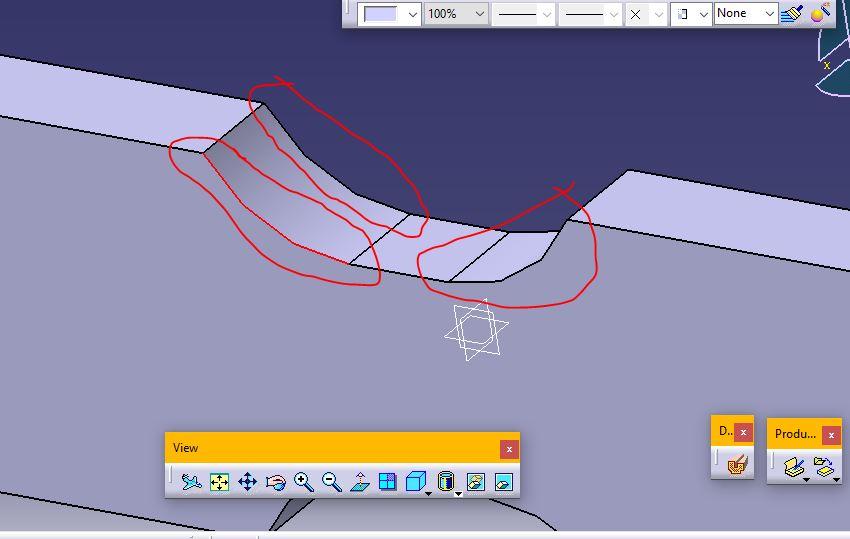
i printed a specimen but the curved part is not printed as a curve. it is like separated line. is there a way to print it as a perfect fillet? because i want to do the fatigue test on it and those lined act as a notch.
thank you
1 Answer

Sounds like the STL was created with too low a resolution.
Most all of the relatively inexpensive 3D printers we use do not print curves. They print a series of short line segments that approximate a curve. The length and angle between these line segments is determined when the CAD file is converted to the STL that the printer requires. There are settings for maximum angle between segments as well as maximum deviation from the curve. These settings determine the ultimate resolution of the STL and the resulting finished part.
There are usually default STL resolutions you can choose from. For instance, Autodesk Inventor has defaults for low, medium, and high resolution. I usually print with medium settings. Even with these defaults, you can still override and customize the settings.
If that is a small arc and the settings were for low resolution then the result would be rough straight line segments rather than something that looks like a curve.
Try increasing the resolution when creating the STL. Make sure you zoom in on that area when you are using the slicer program that creates the g-code for the printer. What you see is what you get. If the resolution is insufficient when generating the g-code then you must go back to your CAD system and change the resolution there for the STL file.
The process flow is something like this:
CAD —> (STL) —> Slicer program —> (g-code) —> 3D-printer
The thing you need to adjust is the resolution during the conversion of the CAD file to the STL.

