

Robotic Arm Assembly – SolidWorks Mechanical Design

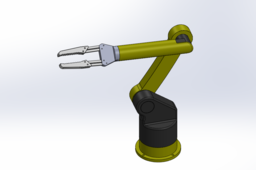
This project presents a conceptual robotic arm design created in SolidWorks for mechanical modeling, assembly practice, and motion visualization.
The model focuses on:
Clean and parametric part design
Proper mechanical assembly structure
Realistic joint definition for motion studies
Modular end-effector interface
🔧 Assembly Components
Base Plate (Fixed Base)
Waist Joint (360° Base Rotation)
Lower Arm (Shoulder Link)
Upper Arm (Elbow Link)
Wrist Rotation Joint
End Effector Mount
Mechanical Gripper
This design is intended for educational and visualization purposes only and does not represent a finalized industrial product.
⚙️ SOFTWARE
SolidWorks
-
Step 1: Robotic Arm Tutorial – Designing the Fixed Base Plate in SolidWorks
In this tutorial, we design the Fixed Base Plate of a robotic arm using SolidWorks.
This part acts as the rigid foundation of the robot and is designed to be bolted to a solid surface.
This base plate will support all upper components of the robotic arm.
-
Step 2: ROBOTIC ARM TUTORIAL - 360 Waist Joint (Base Rotation) Design In Solidworks
This video covers the design of the Waist Joint, which allows 360-degree rotation of the robotic arm on top of the fixed based.
This joint defines the primary rotational axis of the robotic arm.
-
Step 3: Robotic Arm Tutorial – Lower Arm (Shoulder Link) Design in SolidWorks
In this tutorial, we model the Lower Arm (Shoulder Link) of the robotic arm.
This part connects the waist joint to the upper arm and enables vertical motion similar to a human shoulder.
This component plays a major role in load distribution and reach.
-
Step 4: Robotic Arm Tutorial – Upper Arm (Elbow Link) Design in SolidWorks
This video focuses on designing the Upper Arm (Elbow Link) of the robotic arm in SolidWorks.
It connects to the lower arm and allows elbow-like bending motion.
This link improves the robot’s flexibility and working range.
-
Step 5: Robotic Arm Tutorial – End Effector Mount (Wrist to Gripper Connector) in SolidWorks
In this tutorial, we design the End Effector Mount, which serves as a connector between the wrist rotation joint and the mechanical gripper.
This part functions as a mounting interface, allowing the gripper to be attached, aligned, or replaced without redesigning the wrist joint.
-
Step 6: Robotic Arm Tutorial – Mechanical Gripper (End Effector) Design in SolidWorks
This video demonstrates the design of a Mechanical Gripper (End Effector) in SolidWorks.
The gripper is the final component responsible for grasping and holding objects.
-
Step 7: Robotic Arm Assembly & Motion Overview in SolidWorks | Full Mechanical Assembly
In this video, we assemble all previously designed components into a complete robotic arm assembly using SolidWorks.
This tutorial focuses on:
Proper part alignment and assembly structure
Applying mates for realistic joint motion
Organizing components in a clean assembly tree
Preparing the assembly
This assembly is created for educational, visualization, and motion study purposes, demonstrating mechanical design principles in SolidWorks.

