Learn about the GrabCAD Platform
Get to know GrabCAD as an open software platform for Additive Manufacturing
Visit our new homepage
Home
Control
Shop
Streamline Pro
Partner Program
Print
Community
로그인
Library
Challenges
Groups
Questions
Tutorials
Engineers
Blog
로그인
ALLY
Follow
1
followers
United Kingdom
Tutorials
About
Models
0
Tutorials
1
More
Followers
1
Following
2
Likes
11
Following
2
Followers
1
Likes
11
Tutorials
Sort by:
Recent
Recent
Most liked
Most viewed
Most commented
Help with Chris Shakal's Turbofan Blade
ALLY
in
Design & CAD
2
0
Beginner
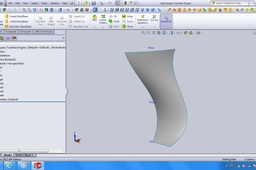
[SOLVED] Hi stephen, thanks so much for your help, I haven't yet downloaded your file i wanted to try it myself, I used your suggestion to use the feature 'boundary surface' in the surfaces tab, in the first dialog box I selected each spline section across the length of the blade, then in the second dialog box (i think its the box saying direction 2) i selected the two splines connecting all endpoints of the sections (there are two of these long splines on either side of the blade) and OK'ed everything and VIOLA! THANKS TO YOU STEPHEN!!! :-)
SOLIDWORKS
solidworks
loft
blades
surface
chris
turbofan
shakal
multi-section