Learn about the GrabCAD Platform
Get to know GrabCAD as an open software platform for Additive Manufacturing
Visit our new homepage
Home
Control
Shop
Streamline Pro
Partner Program
Print
Community
Log in
Library
Challenges
Groups
Questions
Tutorials
Engineers
Blog
Log in
kaiwei
Follow
50
followers
Singapore
Tutorials
About
Models
21
Tutorials
2
More
Followers
50
Following
17
Likes
35
Following
17
Followers
50
Likes
35
Tutorials
Sort by:
Recent
Recent
Most liked
Most viewed
Most commented
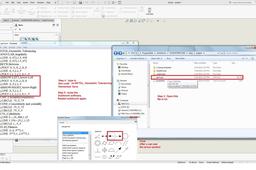
Insert arrow symbol
kaiwei
in
Design & CAD
0
0
Intermediate
Code (copy this, dun worry mistake to type ) *ARROW-LEFT,Arrow-Left A,POLY .0,.5,.8,.2,.8,.8 A,LINE .8,.5,2.2,.5 *ARROW-RIGHT,Arrow-Right A,LINE .8,.5,2.2,.5 A,POLY 2.2,.2,2.2,.8,3.,.5 P/S : if u want horizontal / vertical , can use "Rotate" change the direction.
SOLIDWORKS
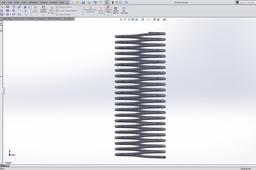
how can i draw this spring?
kaiwei
in
Design & CAD
4
1
Intermediate
Sorry,my english presentation no good.just try my best . u also can reference link: https://www.youtube.com/watch?v=lG8UaRuzkgM
SOLIDWORKS