Learn about the GrabCAD Platform
Get to know GrabCAD as an open software platform for Additive Manufacturing
Visit our new homepage
Home
Control
Shop
Streamline Pro
Partner Program
Print
Community
Log in
Library
Challenges
Groups
Questions
Tutorials
Engineers
Blog
Log in
Learn from thousands of free Tutorials.
New user?
Join the community
or
log in.
Tutorials
Most liked all time
Recent
Most liked
Most viewed
Most commented
This week
This month
All time
Category
Design & CAD
Modeling
Drafting
Assemblies
BOM
Dimensioning / Tolerancing
Translations
Manufacturing & CAM
3D Printing
Tooling
NC Machining
Composites
Measurement / Inspection
Simulation & CAE
FEM
CFD
Kinematics
Process Simulation
Engineering Fundamentals
Theory
Process
Standards
Other
Software
Snagit
Alibre Design
ArchiCAD
AutoCAD
AutoCAD Electrical
Autodesk 3ds Max
Autodesk Alias
Autodesk Inventor
Autodesk Maya
Autodesk Revit
Autodesk 123D
BricsCAD
Bentley MicroStation
BlenderCAD
BobCAD-CAM
CATIA
Delmia
DraftSight
FreeCAD
Femap
Fusion 360
Geomagic Design
IronCAD
JT
Kompas-3D
KeyCreator
KeyShot
Lagoa
Luxology
Mastercam
Moi3D
NX Unigraphics
OBJ
Onshape
OpenSCAD
Parasolid
Powermill
Powershape
Pro/Engineer Wildfire
PTC Creo Parametric
PTC Creo Elements
Rhino
SpaceClaim
SOLIDWORKS
solidThinking Evolve
Solid Edge
SolidFace
STEP / IGES
SketchUp
STL
TopSolid
TinkerCAD
T-Flex CAD
TurboCAD
VectorWorks
ViaCAD 3D
VRML / WRL
ZW3D
Rendering
GrabCAD Print
GrabCAD Community
GrabCAD Workbench
Text file
3D Manufacturing Format
Cinema 4D
Other
Beginner
All levels
Beginner
Intermediate
Expert
fluent
×
2. Solving 2D Problems
Ananth Narayan
in
CFD
16
0
Beginner
In this tutorial we will discuss about the 2D problems which involve defining boundary condition and solving them. Iam going to create the nozzle with the air velocity inlet (ideal) and pressure outlet. Improving mesh obtain good result.
san
fluent
cfd
ansys
1. Introduction about CFD Fluent-ANSYS
Ananth Narayan
in
CFD
10
2
Beginner
In this discussion, we will see basic introduction and changing setting for optimal and user friendly use of ANSYS. This all deals about, how to customize systems, display properties, uses maximum core for meshing, changing background color, and lot's more.
fluent
cfd
ansys
Ansys Tutorial - CFD Of Venturi 2D Using Fluid Flow (Fluent) Module
Anuj Kaushal
in
CFD
6
1
Beginner
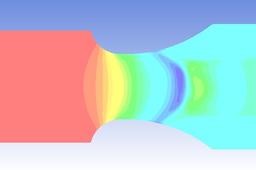
In this tutorial I have made a 2D shape of a venturi using the same software. You will see the changes in the velocity and pressure at the throat region of the venturi , as the fluid reaches the throat region the pressure drops and the velocity increases.
venturi
2d
fluent
cfd
analysis
flow
fluid
tutorial
ansys
Parametric Analysis in ANSYS Workbench Using ANSYS Fluent
Oleksandr Babenko
in
CFD
5
1
Beginner
This tutorial illustrates using an ANSYS Fluent fluid flow system in ANSYS Workbench to set up and solve simply turbulent fluid flow
cfd
parametric
parameter
workbench
ansys
tutorial
fluent
Reylond's number calculation in Solidworks Flow Simulation
Amit Mourya
in
CFD
3
0
Beginner
In this video you are going to learn how to calculate Reynold's number in Solidworks flow simulation . This video is made for beginners so i have made geometry and do simulation everything from scratch with detail explanation i hope you guys will like this video for any doubt and query plz ask in comment Flow simulation playlist : https://www.youtube.com/playlist?list=PLjExndY7KnkBnQ6LS2u9ZfjOMOVGFIfxI
beginner
fluent
ansys
reynolds
nusselt
calculate
how
simulation
flow
solidworks
number
reylonds
Water scavenging
Ananth Narayan
in
CFD
1
0
Beginner
Technique ensured to remove floating particles from ansys CFD Fluent
scavenger
fluent
cfd
ansys
Video Tutorial : Basic flow simulation through perforated plate in Ansys fluent
Jarray.Med Engineering
in
Design & CAD
0
0
Beginner
Video Tutorial : Basic flow simulation through perforated plate in Ansys fluent"
Other
simulation
ansys
fluent
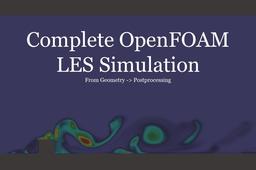
Complete OpenFOAM LES simulation - from geometry creation to postprocessing | OpenFOAM tutorial 1
Interfluo
in
CFD
0
0
Beginner
Consider supporting me on Patreon: https://www.patreon.com/Interfluo When I was trying to learn openfoam, I began by looking up tutorials on youtube. Most of the so-called tutorials I found simply taught users how to run a pre-loaded case, this basically amounted to typing in a meshing command followed by an execute calculation command. In this video I hope to provide users with enough information that they feel comfortable running their own custom simulation. One step I left out was creating the initial project folder; to do this simply copy a tutorial example that closely resembles what you want to do. If I left anything else out or was too vague, leave it in the comments and I will do my best to help. starting project folder: https://github.com/Interfluo/OpenFOAM-LES-tutorial-1.git
fluent3dmeshtofoam
fluent
conversion
mesh
10
windows
pisofoam
paraview
les
openfoam