Learn about the GrabCAD Platform
Get to know GrabCAD as an open software platform for Additive Manufacturing
Visit our new homepage
Home
Control
Shop
Streamline Pro
Partner Program
Print
Community
Connexion
Library
Challenges
Groups
Questions
Tutorials
Engineers
Blog
Connexion
Learn from thousands of free Tutorials.
New user?
Join the community
or
log in.
Tutorials
Most liked all time
Recent
Most liked
Most viewed
Most commented
This week
This month
All time
Category
Design & CAD
Modeling
Drafting
Assemblies
BOM
Dimensioning / Tolerancing
Translations
Manufacturing & CAM
3D Printing
Tooling
NC Machining
Composites
Measurement / Inspection
Simulation & CAE
FEM
CFD
Kinematics
Process Simulation
Engineering Fundamentals
Theory
Process
Standards
Other
Software
Snagit
Alibre Design
ArchiCAD
AutoCAD
AutoCAD Electrical
Autodesk 3ds Max
Autodesk Alias
Autodesk Inventor
Autodesk Maya
Autodesk Revit
Autodesk 123D
BricsCAD
Bentley MicroStation
BlenderCAD
BobCAD-CAM
CATIA
Delmia
DraftSight
FreeCAD
Femap
Fusion 360
Geomagic Design
IronCAD
JT
Kompas-3D
KeyCreator
KeyShot
Lagoa
Luxology
Mastercam
Moi3D
NX Unigraphics
OBJ
Onshape
OpenSCAD
Parasolid
Powermill
Powershape
Pro/Engineer Wildfire
PTC Creo Parametric
PTC Creo Elements
Rhino
SpaceClaim
SOLIDWORKS
solidThinking Evolve
Solid Edge
SolidFace
STEP / IGES
SketchUp
STL
TopSolid
TinkerCAD
T-Flex CAD
TurboCAD
VectorWorks
ViaCAD 3D
VRML / WRL
ZW3D
GrabCAD Print
Rendering
GrabCAD Community
GrabCAD Workbench
Text file
3D Manufacturing Format
Cinema 4D
Other
Intermediate
All levels
Beginner
Intermediate
Expert
simple
×
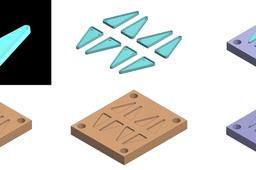
It is a simple plastic mold release method.
Yalçın CAN ( YOUR CONFIDENCE )
in
Tooling
6
2
Intermediate
It is a simple plastic mold release method. In order to create a simple plastic mold, the model must first be completed. Mold separation line is determined in accordance with the model. Then, as shown in the picture, a female mold is created. After the creation of a female mold, a male mold is created. At the end, the pusher pins are placed to remove the part remaining in the male mold in accordance with the model and the process is completed. These processes are also very simple for mold creation. You can review other models and patterns on my page and use these examples. My request from you is that you like my models while downloading.
method
molding
plastic
simple
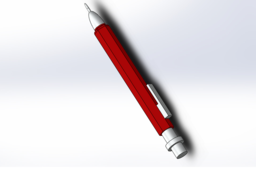
Solidworks 2017 Tutorial: Design a Mechanical Pen in 8 Simple Steps|Dome, Boss, Base Extrude offset|
Muhammad Khan
in
Design & CAD
4
0
Intermediate
https://youtu.be/jw-Dv_kT8lo Here is a tutorial on how to design a mechanical pen in Solid works. A pen has been modeled by sketches, boss/bass extrude, offset extrude and Dome commands. Don't forget to like and subscribe my channel as it helps me bring more tutorial videos to your comfort. Here is a pdf. version of the same tutorial: https://tinyurl.com/y7hzhjxy Below is a brief description of the Solidworks course that was mentioned in the video. You can download free project instructions at the provided links. Enjoy Designing this beautiful yacht Visit ► https://tinyurl.com/y89bn4uq◄ to download a free SolidWorks eBook. In this free PDF tutorial you will discover how to model an amazing yacht in Solid Works. With this step-by-step modeling course, your modeling skills will be launched to an expert level in only a couple of weeks. You will start with the basics, such as the propeller and radar, and then progress to more complicated models ending with challenging shapes like the Hull and Superstructure using advanced surface modeling techniques. I am a huge Sunseeker fan. That's why this yacht model is based on the existing Sunseeker Predator 108. So the full credits for the design will go to Sunseeker. This course will help you to discover the most important features of SOLIDWORKS in a creative and innovative way. You will also get a solid understanding of advanced surface modeling in SOLIDWORKS. All the exercises together will form a beautiful yacht to put in your portfolio. This practical way of working makes it challenging, but interesting, and is one of the greatest strengths of this tutorial package. I am 100% sure that this tutorial package will help you to become successful as a designer or engineer FAST. Click here to download your free eBook: https://tinyurl.com/y89bn4uq Follow on youtube: https://tinyurl.com/yc7x6fqd Google Plus:
SOLIDWORKS
steps
simple
works
solid
pen
mechanical
design
smartapproach
fan-blade design using wireframe design in catia
kiran
in
Modeling
3
0
Intermediate
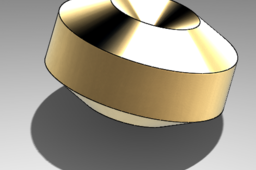
here you can find how to create a fan blade using catia . will be really helpful for the beginners
CATIA
best
intermediate
cad
steps
simple
part
wireframe
blade
tutorial
surface
v5
catia
How to do great renders in SolidWorks
Hajiba bakhti
in
Design & CAD
2
2
Intermediate
If you don't have Photoview 360 or SOLIDWORKS Visualize, you also can do great renders with simple tools. Tip: Select Plain white or Backdrop - Grey with overhead ligths scene when enable Realview Graphics
SOLIDWORKS
great
realistic
solidworks
tools
simple
render
Rendering
Syed Shayan Ahmed
in
Translations
0
0
Intermediate
Simple rendering on models
SOLIDWORKS
simple
cad
translation
intermediate
background
solidworks
render
Assembly
Syed Shayan Ahmed
in
Assemblies
0
0
Intermediate
Simple Assembly to advanced mates
SOLIDWORKS
cad
mechanical
mates
simple
intermediate
solidworks
assembly